
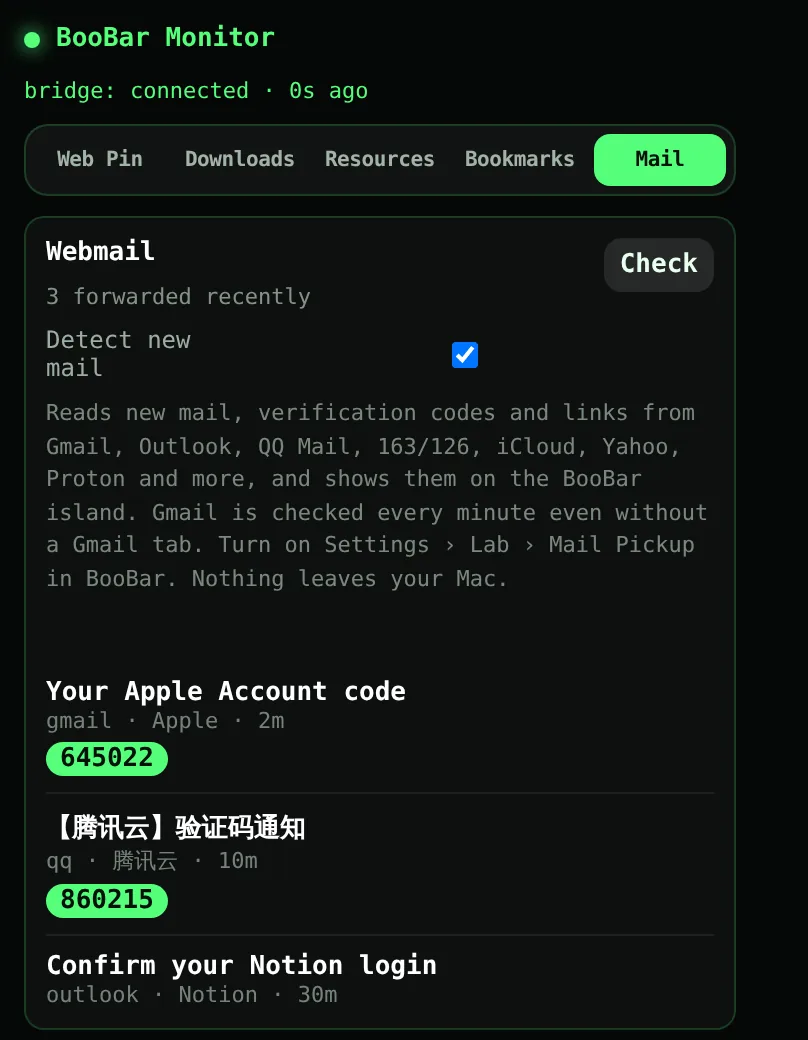
Works with the webmail you already use
The BooBar extension reads new mail from Gmail, Outlook, QQ Mail, 163/126, iCloud Mail, Yahoo Mail, Proton Mail and more. Gmail is checked every minute even when no Gmail tab is open. You never type your email password into BooBar.
- New unread mail from your inbox list, and the message you're reading.
- New-mail notifications from your webmail, mirrored to the island.
- Everything goes only to BooBar on your own Mac (127.0.0.1) — never to a server.
Codes and links, not just “you've got mail”
BooBar finds the actual code in the message — in English, Chinese, Japanese or Korean — and ignores order numbers, dates, prices and phone numbers. Sign-in and confirmation links are pulled out of the mail as buttons.
- One click copies the code to the clipboard.
- Links are unwrapped from Google and Outlook redirect wrappers; unsubscribe links are skipped.
- Suspicious links (raw IP addresses, look-alike domains, short links) are flagged. BooBar never pre-opens a link, so single-use sign-in links stay valid.
POP3 works too
Prefer a mail account outside the browser? Add any POP3 mailbox with an app password, and BooBar fetches new mail every minute. Webmail and POP3 can run side by side.
Questions, answered
Do I have to give BooBar my email password?
Not for webmail. The Chrome extension reads the mail you already see in your signed-in browser. A password (or app password) is only needed if you choose to add a POP3 account.
Which email providers are supported?
Gmail, Outlook / Microsoft 365, QQ Mail, 163, 126, Yeah.net, iCloud Mail, Yahoo Mail, Proton Mail, Fastmail, Zoho Mail, Alibaba Mail and Sina Mail in Chrome, plus any POP3 account.
Does BooBar read all of my email?
No. It looks at new unread mail and the message you open, keeps what it finds on your Mac, and never changes your mailbox — mail isn't marked as read.
Does it work in Safari?
Webmail detection uses the Chrome extension, so it works in Chrome and Chromium-based browsers that can load Chrome extensions. POP3 works regardless of browser.