
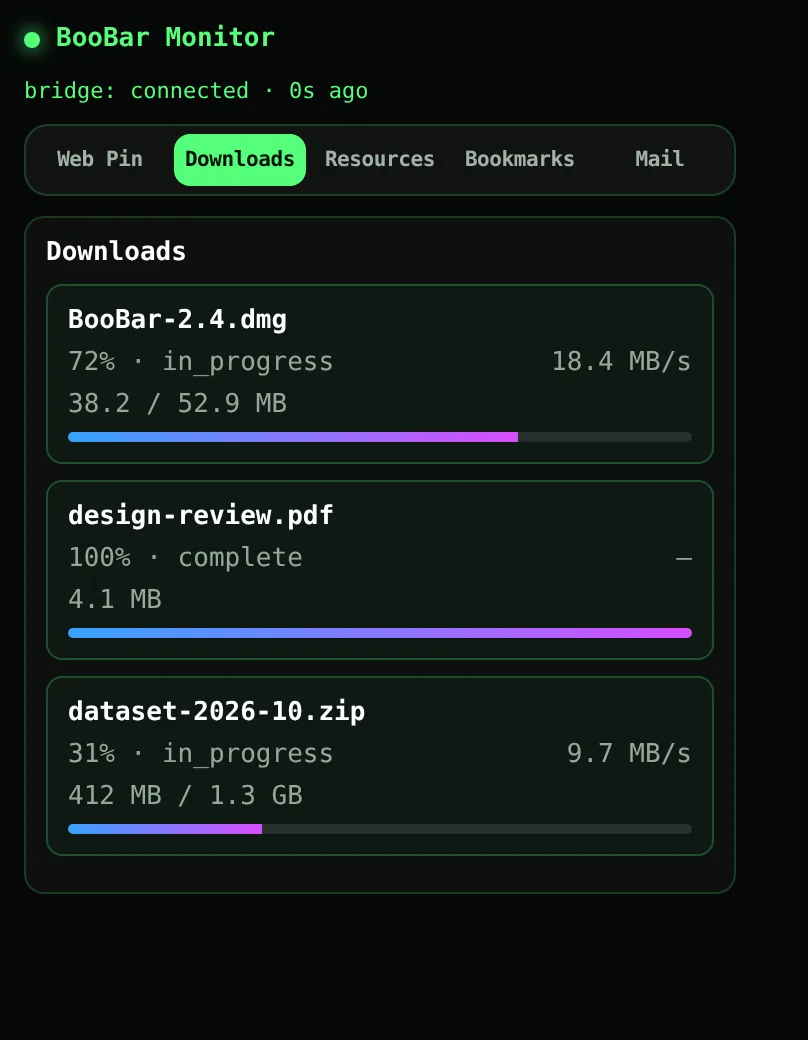
Progress you can read from across the room
Each active download gets a row with its file name, progress, speed and size. Several downloads at once? They stack neatly and disappear a few seconds after they finish.
- Live percentage, speed and downloaded / total size.
- Several downloads at once, newest first.
- Finished files show a short done state, then clear themselves.
Video and audio too
Press ⌃⇧N and choose YouTube in the wheel to paste a link and grab the video or audio in the background — its progress shows on the island just like a Chrome download.
Questions, answered
Does this slow down my downloads?
No. The extension only reads progress that Chrome already reports; downloads happen exactly as before.
Does it work with Safari?
Download progress comes from the Chrome extension, so it works with Chrome and Chromium-based browsers that load Chrome extensions.
Is anything sent to the internet?
No. Download information goes only to BooBar on your Mac (127.0.0.1).
Do I need a notch?
No. BooBar works on any Mac with macOS 14 or later.